If your booking page looks like every other scheduling link on the internet, you are probably losing leads before the meeting even starts. In 2026, businesses need more than a plain calendar widget. They need a booking experience that builds trust, explains the offer, answers objections, and makes prospects feel confident enough to book.
That is where Lunacal comes in.
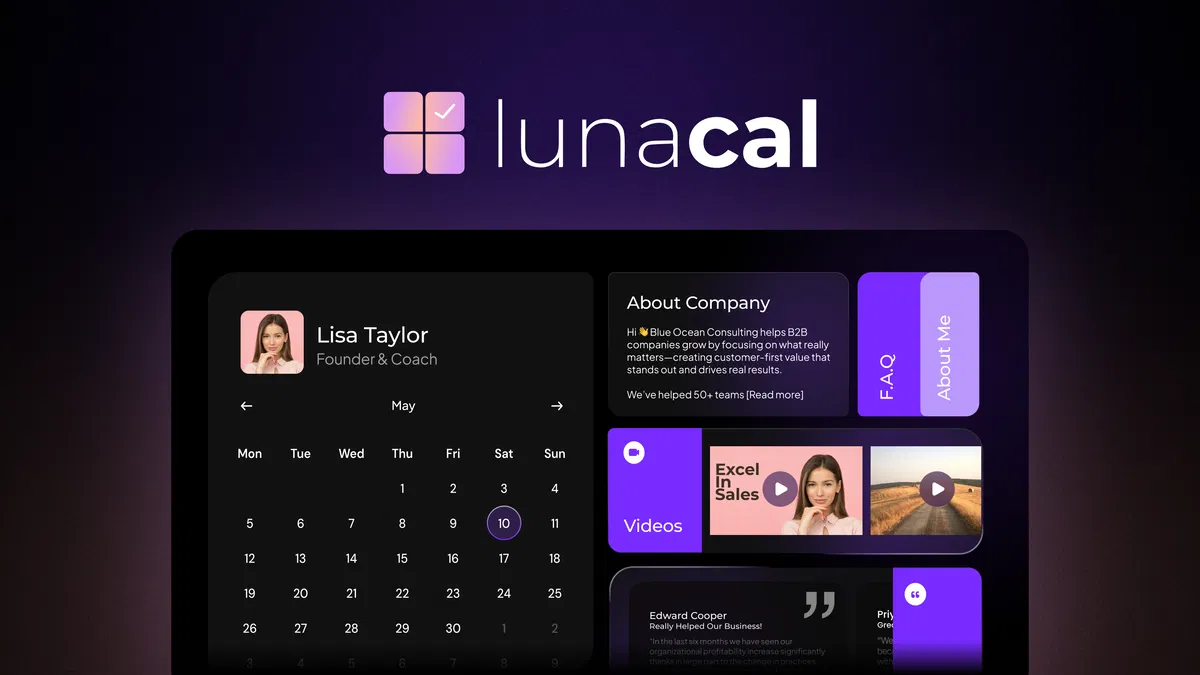
Lunacal is a scheduling platform built for consultants, agencies, coaches, and service businesses that want more control over how their booking page looks and performs. Instead of giving prospects a boring time-slot page, Lunacal lets you create a branded scheduling experience with testimonials, videos, FAQs, company information, social links, and custom layouts.
In this review, I will break down what Lunacal does, who it is best for, its standout features, AppSumo-style value, and whether it is worth choosing over traditional tools like Calendly or Acuity.
What Is Lunacal?
Lunacal is a meeting scheduling and booking platform that combines appointment booking with page customization, automation, and branding. It is designed to help businesses do more than just collect bookings.
With Lunacal, you can manage:
- 1:1 meetings
- Group bookings
- Paid meetings
- Packages
- Team scheduling
- Round-robin bookings
- Collective scheduling
But what makes it different is how it presents those booking options. Based on the images and product positioning, Lunacal turns the scheduling page into something closer to a landing page. You can add sections like:
- About Company
- FAQs
- Testimonials
- Videos
- Social proof
- Custom profile information
That makes it especially useful for businesses where trust and presentation matter before someone commits to a call.
The “At-a-Glance” Essentials
- Best For: Consultants, Marketing Agencies, and Sales Teams.
- Top Alternatives: Calendly, Acuity Scheduling, and TidCal.
- Key Integrations: Google Calendar, Outlook, Apple Calendar, Zoom, Google Meet, MS Teams, Zapier, and Stripe/PayPal.
- Special Sauce: Modular “Workspaces” that act like mini-websites for your booking events.
User Interface & Experience
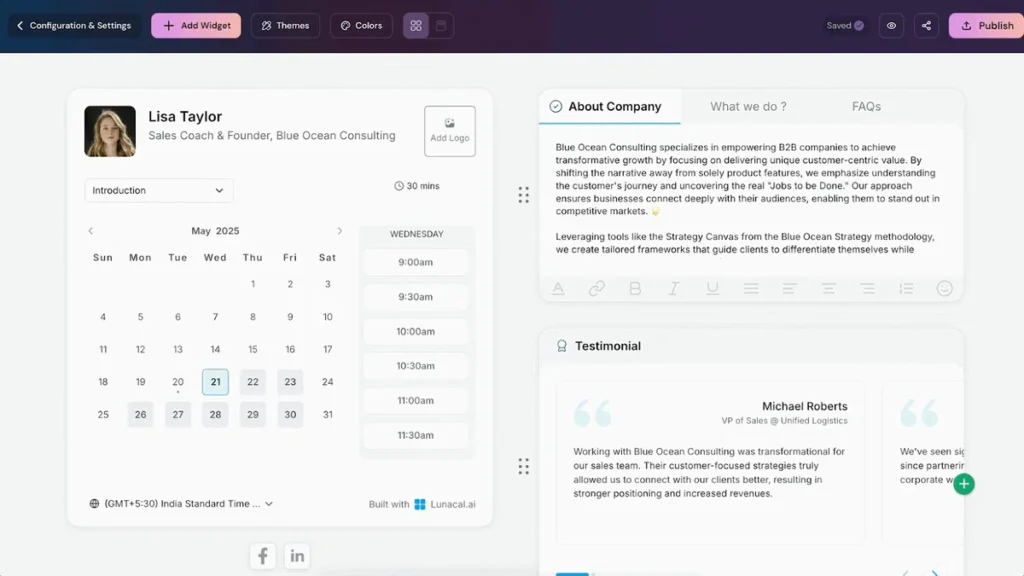
Based on the dashboard previews, Lunacal opts for a clean, “Bento-box” style UI. The Integration panel is incredibly intuitive, showing clear categories for Calendars, Meeting Tools, and Payments.
Setting up an event (as seen in the “Event Setup” screenshot) is a simple step-by-step process where you can toggle “Allow booker to select duration” or set “Buffers” to ensure you never have back-to-back meetings without a coffee break.
Key Features of Lunacal
1. Branded Booking Pages That Actually Sell
This is the headline feature.
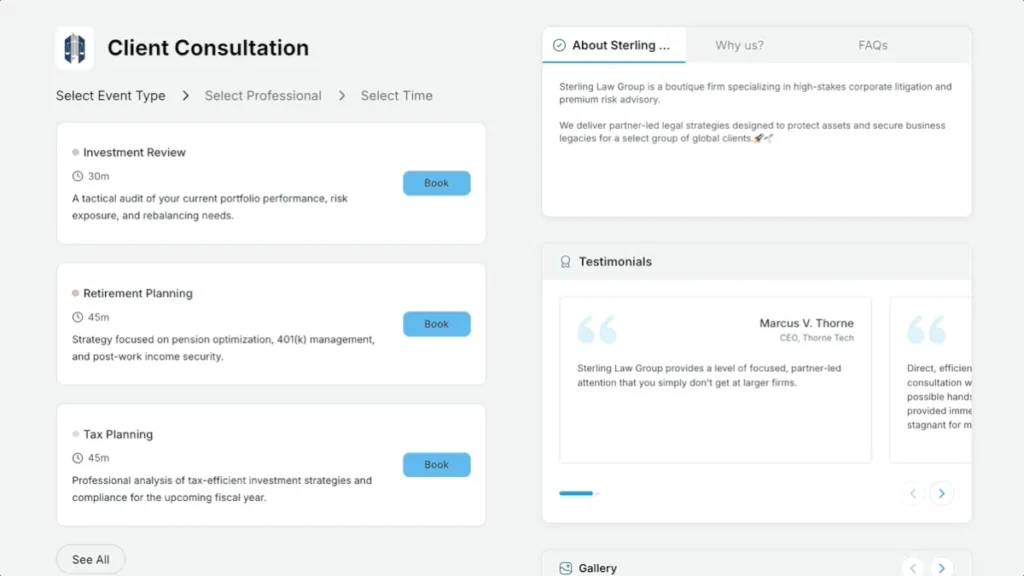
Lunacal turns a booking link into a conversion-focused page. From the screenshots, you can clearly build pages with:
- Profile details
- Company descriptions
- Testimonials
- FAQs
- Content tabs
- Video sections
- Social links
- Gallery-style content blocks
That means your scheduling page can do some of the work your landing page normally does. Instead of sending cold prospects to an empty calendar, you can warm them up with proof, context, and trust signals.
2. Flexible Event Setup
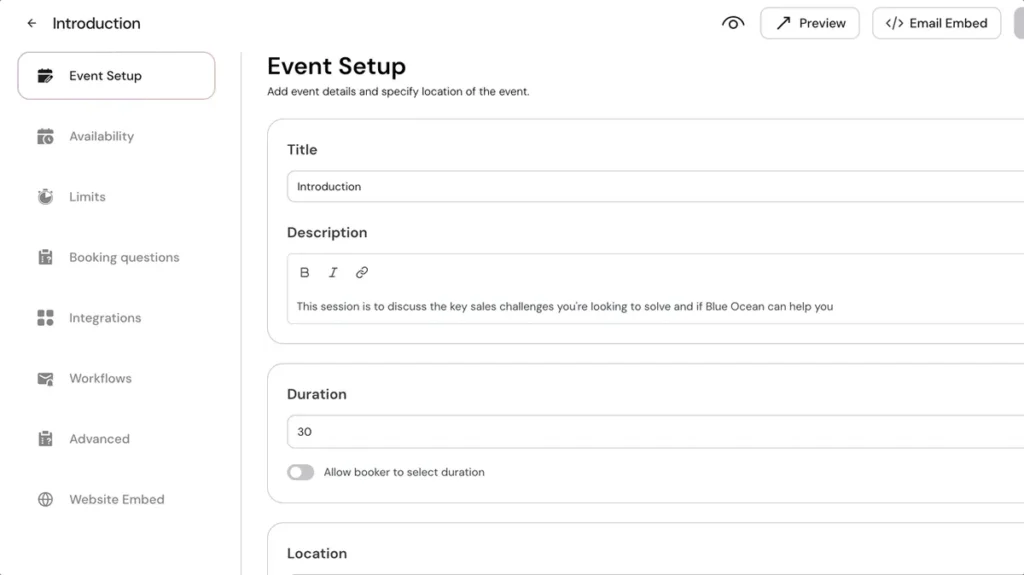
Lunacal supports more than simple one-on-one scheduling. It is built to handle:
- 1:1 appointments
- Group events
- Paid sessions
- Team scheduling
- Packages
- Round-robin allocation
- Collective scheduling
This gives it a lot more range than a basic personal booking tool. Agencies, service teams, and consultants with multiple call types can manage everything in one place.
3. Automated Reminders and Workflows
Lunacal includes automated reminders and workflow automation for before, during, and after meetings.
You can use it to send:
- Email reminders
- SMS reminders
- Follow-up messages
- Pre-meeting prep content
- Re-engagement messages after cancellations
That helps reduce no-shows and cuts down on manual admin work, which is a big win for busy teams.
4. Calendar Sync Across Multiple Platforms
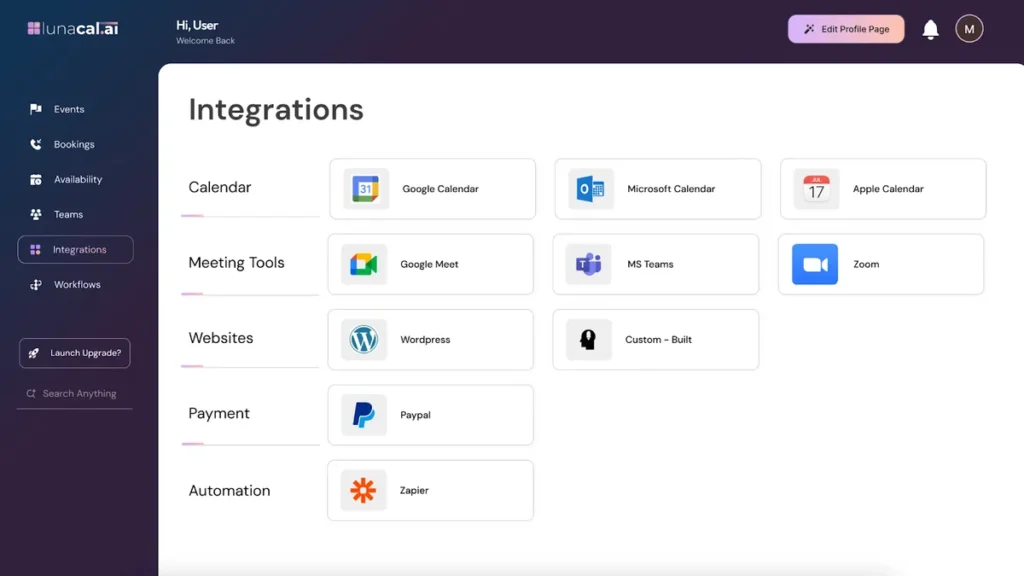
Lunacal supports syncing with:
- Google Calendar
- Microsoft Calendar
- Apple Calendar
This is useful for users who manage different calendars at once or operate across multiple accounts. Better sync also means fewer double-bookings and smoother scheduling.
5. Meeting Tool Integrations
From the integrations screen, Lunacal works with:
- Google Meet
- MS Teams
- Zoom
That makes it easy to connect scheduling with actual meeting delivery, without patching together too many separate tools.
6. Website Embeds
Lunacal can be embedded directly into your website, which is important for businesses that want a more seamless branded experience. Instead of redirecting visitors to a generic third-party page, you can keep the booking flow on your own site.
7. Team Scheduling
Lunacal supports advanced team scheduling scenarios, including:
- Round-robin distribution
- Collective scheduling
- Team-based availability
This makes it more useful for agencies, sales teams, and service businesses where multiple people may handle incoming calls.
8. Paid Bookings
Lunacal supports paid meetings through Stripe or PayPal, with 0% commission according to the provided product details.
That makes it useful for:
- Coaches
- Consultants
- Freelancers
- Advisors
- Paid strategy calls
- Workshops or consulting sessions
9. Booking Questions and Approval Controls
Lunacal lets users add custom booking questions and even manually approve or reject bookings before confirming them.
That is valuable if you want to qualify leads before accepting a meeting, or if you only want to take calls with prospects who meet specific criteria.
10. Multi-Language and Time Zone Support
Lunacal supports 13+ languages and handles time zones smoothly. For international businesses or multilingual teams, this can make a big difference in reducing booking confusion.
Lunacal vs Traditional Scheduling Tools
Compared with typical scheduling tools, Lunacal is clearly more focused on presentation and conversion.
A basic scheduler gives you:
- Availability
- A booking link
- Calendar sync
Lunacal adds:
- Branded pages
- Testimonials
- FAQs
- Videos
- Page sections
- Team scheduling
- Paid meetings
- Workflows
- Lead qualification
- Custom embeds
That does not make basic tools bad. It just means Lunacal is aimed at users who see meetings as part of their marketing and sales process, not just a calendar function.
Lunacal AI vs. Calendly
| Feature | Lunacal AI | Calendly |
| Custom Branding | Full (Videos, Testimonials, FAQs) | Limited |
| Commission Fee | 0% | 0% (on higher tiers) |
| Social Media Embeds | Yes (Insta, YT, LinkedIn) | No |
| Custom Domain | Yes | Yes (Pro Only) |
| Languages | 13+ Supported | Limited |
Who Is Lunacal Best For?
Lunacal is best for businesses that rely on meetings as part of their sales or service process.
It is especially useful for:
Consultants
Consultants need more than availability sharing. They need a booking page that explains their offer, builds credibility, and makes clients more comfortable before the call.
Marketing Agencies
Agencies often need branded discovery call pages, multiple call types, team scheduling, and integration with existing tools. Lunacal fits that use case well.
Coaches and Freelancers
For paid calls, coaching sessions, and consults, Lunacal gives users a more polished and premium-feeling booking experience.
Small Service Businesses
If appointments drive revenue, a better booking page can make a real difference. Lunacal helps smaller businesses look more established and organized.
Teams With Shared Scheduling
Round-robin and collective scheduling make Lunacal a strong option for teams handling inbound leads or customer calls together.
Lunacal AI Pros and Cons : AppSumo Lifetime Deal
Pros
- Booking pages look far more branded than generic scheduling tools
- Great for consultants, agencies, and service businesses
- Supports 1:1, team, group, and paid bookings
- Includes reminders, workflows, and automation
- Strong integration support with calendars, meeting apps, WordPress, PayPal, and Zapier
- Useful for qualifying leads with custom booking questions
- Works well for teams with round-robin and collective scheduling
- More conversion-focused than plain calendar links
Cons
- Users wanting only a very basic scheduler may not need all the customization
- Setting up a polished booking page may take more time than using a plain booking link
- Businesses that do not care about branding or lead conversion may not get the full value
- Some advanced workflow setups may require a bit of experimentation at the beginning
Is Lunacal Worth It?
For the right user, yes.
If your business wins clients through calls, demos, consultations, or strategy sessions, Lunacal offers more value than a plain scheduler because it helps shape the entire booking experience.
It is especially worth considering if:
- You want a more premium-looking booking page
- You need to build trust before the meeting
- You want to include testimonials, videos, or FAQs
- You run team scheduling workflows
- You sell paid sessions
- You want automation around reminders and follow-ups
If all you need is a simple link to pick a time, Lunacal may be more than necessary. But if your booking page is part of your funnel, it is a much stronger fit.
Lunacal is a smart scheduling tool for businesses that want their booking page to do more than just book meetings.
It combines booking, branding, automation, and team scheduling in a way that feels more modern and more useful than a standard calendar link. The platform’s real strength is turning a routine scheduling page into a lead conversion asset.
For consultants, agencies, coaches, and service-based businesses, that can be a meaningful advantage.
Rating: 4.7/5
Lunacal is best for users who want a polished, branded, and conversion-friendly booking experience with enough flexibility to handle both solo and team-based scheduling.
If you want to replace a generic booking page with a scheduling experience that builds trust and helps convert more prospects, Lunacal is worth a close look.
Lunacal AI AppSumo Lifetime Deal Features by Price
License Tier 1 — $59
- Lifetime access
- 2 users/licenses
- Manage up to 2 companies
- Remove “Powered by Lunacal” branding from booking page
- Multiple themes, colors, backgrounds, and animations
- SMS and email meeting reminders
- Scheduling page widgets
- Beautifully Booked
- Integrations
- Paid meetings
- Coupons and discounts
- Multi-team hierarchies
- Team booking pages
- Flexible meeting locations
- Unlimited calendars and bookings
License Tier 2 — $169
- Lifetime access
- 7 users/licenses
- Manage up to 7 companies
- Includes everything in Tier 1:
- Remove branding
- Multiple themes, colors, backgrounds, and animations
- SMS and email reminders
- Scheduling page widgets
- Beautifully Booked
- Integrations
- Paid meetings
- Coupons and discounts
- Multi-team hierarchies
- Team booking pages
- Flexible meeting locations
- Unlimited calendars and bookings
License Tier 3 — $319
- Lifetime access
- 20 users/licenses
- Manage up to 20 companies
- Includes everything in Tier 2:
- Remove branding
- Multiple themes, colors, backgrounds, and animations
- SMS and email reminders
- Scheduling page widgets
- Beautifully Booked
- Integrations
- Paid meetings
- Coupons and discounts
- Multi-team hierarchies
- Team booking pages
- Flexible meeting locations
- Unlimited calendars and bookings
Key Difference Between Tiers
The main visible difference in this pricing table is scale:
- Tier 1: 2 users / 2 companies
- Tier 2: 7 users / 7 companies
- Tier 3: 20 users / 20 companies
Included Features Across All Tiers
From the table, all three tiers include:
- Remove “Powered by Lunacal” branding from booking pages
- Multiple themes, colors, backgrounds, and animations
- SMS and email meeting reminders
- Scheduling page widgets
- Beautifully Booked
- Integrations
- Paid meetings
- Coupons and discounts
- Multi-team hierarchies
- Team booking pages
- Flexible meeting locations
- Unlimited calendars and bookings
Best Value by Use Case
If you are a solo professional or a very small business, Tier 1 should be enough. If you manage bookings for several clients or team members, Tier 2 gives a better balance of price and scale. If you run an agency or need Lunacal for many users and companies, Tier 3 offers the most expansion room.
Final Verdict
If you want to look like a “Premium” brand and increase your booking-to-show-up rate, Lunacal AI is a no-brainer. It’s a one-time investment that replaces a monthly subscription and makes you look significantly more professional to your clients.