Let’s be honest: no matter how fast you type, your brain is always faster. There is a specific kind of mental friction that happens when you have a brilliant idea for a client email or a blog post, but the “act of typing” slows you down.
Standard dictation tools are usually a nightmare—they catch every “um,” “uh,” and grammar mistake, leaving you with more work to do than when you started.
Blip AI claims to solve this by turning your natural, messy speech into “polished, ready-to-send” text. I’ve spent the last week using it to answer emails, draft Slack messages, and even write code snippets. Here is my deep-dive review into whether this is a productivity “must-have” or just another voice-to-text gimmick.
What is Blip AI?
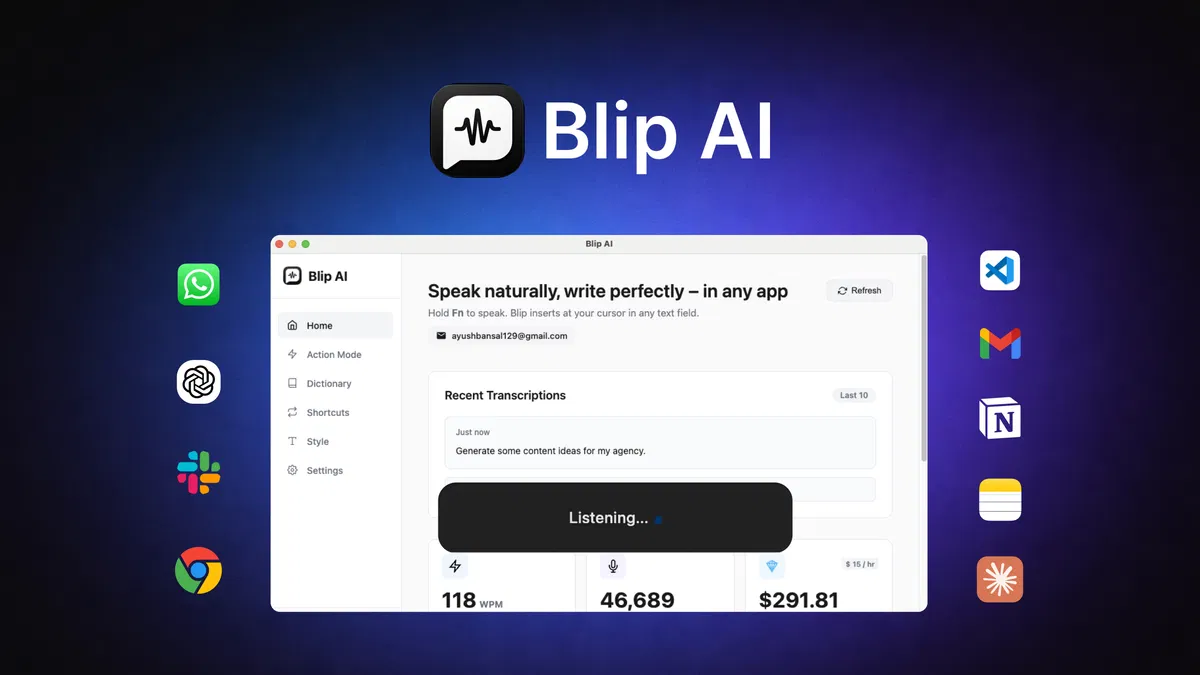
Blip AI is a cross-platform (Mac, Windows, Android) productivity tool that sits quietly in your system until you need it. Unlike traditional dictation apps that only work in a specific window, Blip is a global assistant. You hit a hotkey, speak, and the AI polishes your words and drops them wherever your cursor is blinking.
Blip AI Quick Summary
| Feature | Capability |
| Core Function | Speech-to-Polished-Text (AI Refinement) |
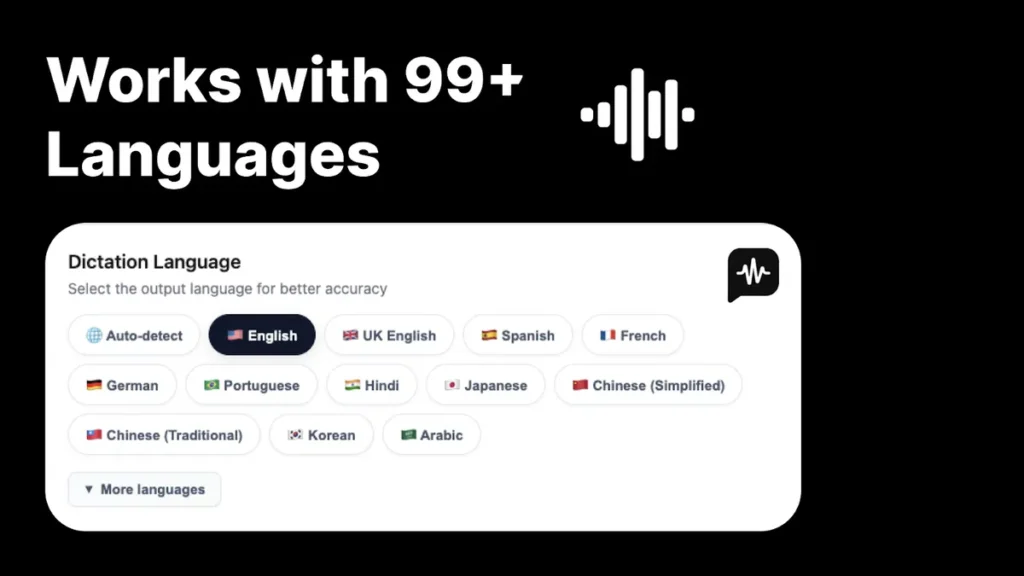
| Language Support | 99+ Languages with Auto-detect |
| Compatibility | Windows, macOS, Android (Every app) |
| Action Mode | “Hey Blip” voice commands for drafting |
| Best For | Marketers, Agency Owners, Developers |
Blip AI Review: The Core Features: Why It’s Different
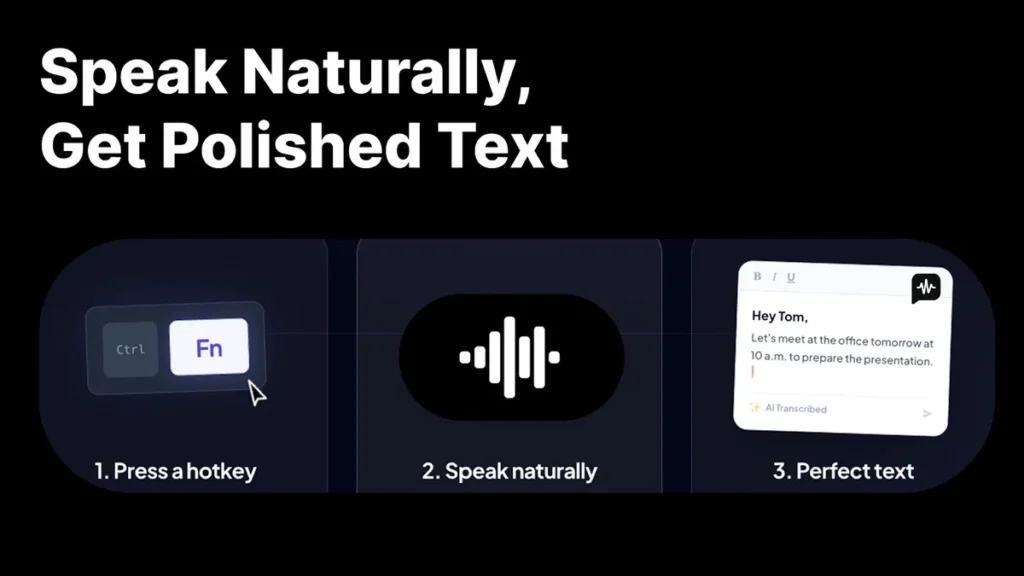
1. Speak Naturally, Get Polished Text
The biggest win for Blip is its ability to remove filler words. If you say, “Uh, hey Tom, I was thinking, um, let’s meet tomorrow at 10 to, you know, do the slides,” Blip outputs: “Hey Tom, let’s meet tomorrow at 10 a.m. to prepare the presentation.”
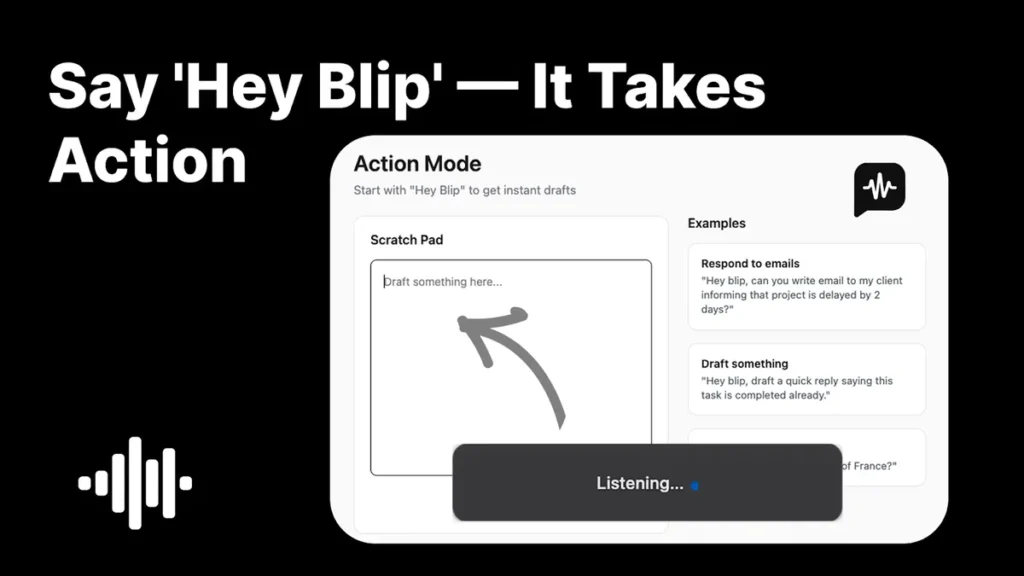
2. “Hey Blip” Action Mode
This is where it moves from a “dictation tool” to an “assistant.” By using the “Action Mode,” you can give commands rather than just dictating. You can say, “Hey Blip, draft a quick reply saying this task is completed already,” and it will generate the entire professional response for you.
3. Universal Compatibility
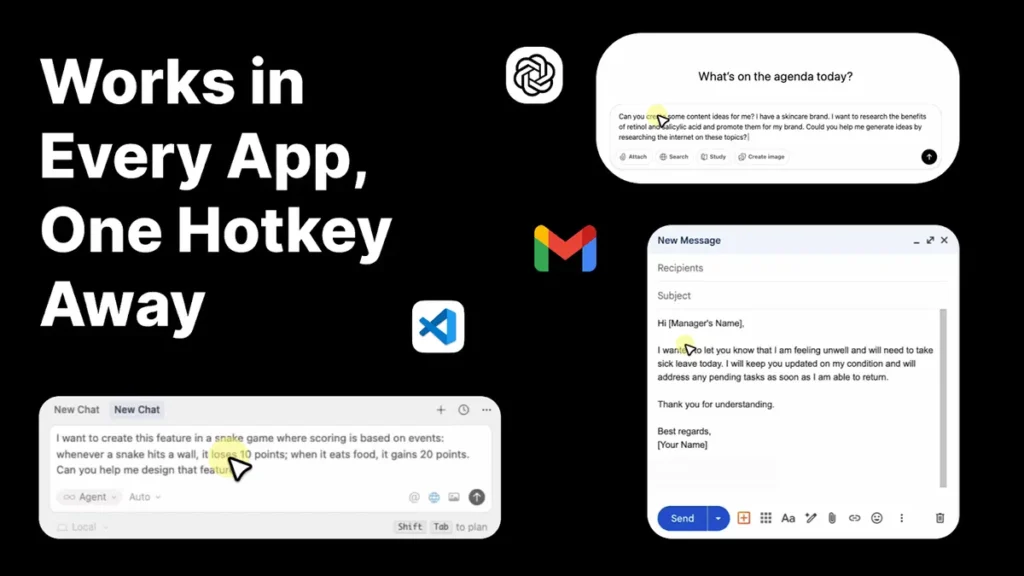
Whether you are writing an email in Gmail, an update in Slack, or even writing a snake game in VS Code, Blip works. Because it operates at the system level, it doesn’t care what app you are using.
Blip AI Review – Real-Life Case Study: The Busy Marketer
The Problem: A digital marketing specialist was spending 3 hours a day just responding to client queries and Slack messages, leading to “typing fatigue” and slower turnaround on creative tasks.
The Blip Solution: They integrated Blip AI for all internal communications and initial email drafts. Instead of typing, they spoke their thoughts while walking around the office.
The Result: Response time dropped by 60%. The “Action Mode” allowed them to draft complex project updates in seconds, freeing up nearly 90 minutes of “deep work” time every day.
Blip AI Review
Blip AI Pros and Cons: The Honest Breakdown
The Good (Pros)
-
Global Hotkey: It’s always one tap away. No switching tabs.
-
Multilingual: Supports 99+ languages, which is a game-changer for international agencies.
-
Filler Word Removal: The AI polishing is aggressive in a good way—it makes you sound more professional.
-
Cross-Platform: Having the same experience on Windows and Android is a massive plus.
The Not-So-Good (Cons)
-
Learning Curve for Commands: Learning how to phrase “Action” commands takes a few tries to get the best results.
-
Privacy: Like all AI tools, your voice data is processed by an LLM (though standard for 2026, it’s worth noting).
Blip AI Pricing: The “Subscription Trap” vs. The Lifetime Solution
When it comes to high-end AI productivity tools, the pricing structure usually determines whether a tool is a “nice-to-have” or a “must-have.” With Blip AI, you have two very different paths: the recurring monthly cost of the official site or the one-time “buy it once, own it forever” deal on AppSumo.
Here is the breakdown of why one of these is a clear winner for your wallet.
1. Official Pricing: The Annual Commitment
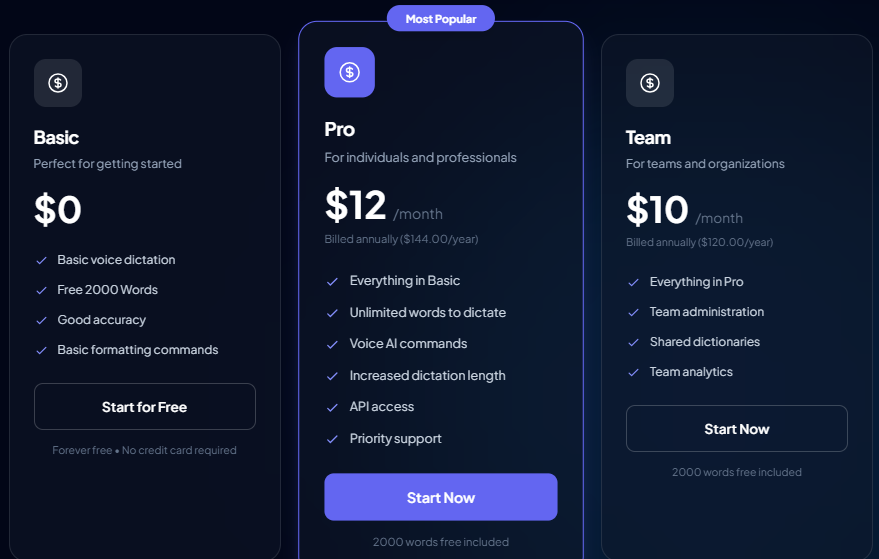
If you go through the official Blip AI website, you are looking at a traditional SaaS subscription model.
-
Basic ($0): Great for a quick test, but with only 2,000 words, you’ll run out in about 10 minutes of talking.
-
Pro ($12/month – Billed Annually): This is the standard professional tier. It costs $144 per year, every single year. While it offers “Unlimited Words,” most individual users rarely need more than 200k–500k words a month anyway.
-
Team ($10/month per user): Designed for organizations, adding analytics and shared dictionaries.
2. AppSumo Lifetime Deal: The One-Time Investment
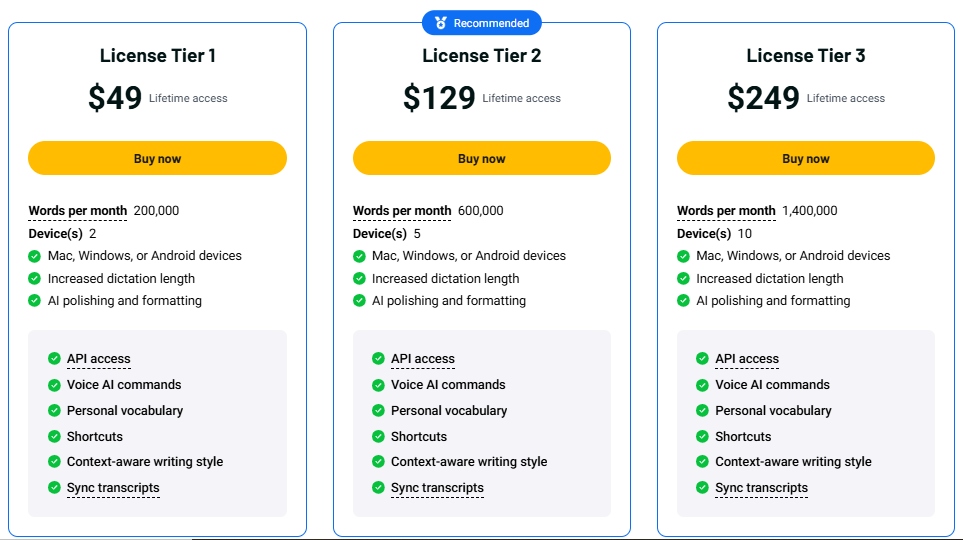
The AppSumo deal completely changes the ROI (Return on Investment) calculation. You pay once, and your credits reset every single month for life.
| Feature | License Tier 1 | License Tier 2 (Recommended) | License Tier 3 |
| One-Time Price | $49 | $129 | $249 |
| Words Per Month | 200,000 | 600,000 | 1,400,000 |
| Devices | 2 | 5 | 10 |
| Future Updates | Included | Included | Included |
| Core Features | AI Polishing, API, Voice Commands, Sync | AI Polishing, API, Voice Commands, Sync | AI Polishing, API, Voice Commands, Sync |
Why the AppSumo Deal is the Absolute Best Choice
If you are a freelancer, content creator, or small business owner, the AppSumo deal is a “no-brainer” for three specific reasons:
💰 The “Break-Even” Point is Insanely Fast
If you buy License Tier 1 for $49, you have paid the equivalent of just 4 months of the official Pro subscription ($12/mo). After month four, Blip AI is essentially free for you forever. Every year after that, you are saving $144.
🚀 More Than Enough “Fuel” (Words)
The official Pro plan offers “Unlimited” words, which sounds great. But let’s look at the math: The average person speaks about 130–150 words per minute. To hit the 200,000-word limit of Tier 1, you would have to dictate for roughly 22 hours every single month. For 90% of users, Tier 1 or Tier 2 is effectively “unlimited.”
📱 Multi-Device Support
The AppSumo tiers allow you to install Blip AI on 2 to 10 devices. This is huge if you switch between a Windows desktop at the office, a MacBook at home, and an Android phone on the go. The official Pro plan is typically tied to a single user account, but the AppSumo tiers give you more flexibility across your hardware.
My Recommendation: Which Tier Should You Pick?
-
Pick Tier 1 ($49): If you are an individual freelancer or blogger who mainly uses it for emails and short articles. It’s the best value-for-money entry point.
-
Pick Tier 2 ($129): This is the sweet spot. With 600k words and 5 devices, you can stay signed in on all your gadgets and never worry about hitting a limit, even if you’re a heavy content creator or developer.
-
Pick Tier 3 ($249): Best for small agencies or power users who want to use the API for high-volume automation.
Final Verdict on Pricing: Don’t get stuck in another monthly subscription. Grab the AppSumo deal while it’s available. If you don’t find yourself using it as much as you thought, AppSumo’s 60-day money-back guarantee means you can get a full refund—no questions asked.
Check the Blip AI Lifetime Deal on AppSumo
Blip AI Final Verdict & Rating
Product Rating: ⭐⭐⭐⭐⭐ (4.7/5)
Blip AI is a rare tool that actually delivers on the promise of “frictionless productivity.” It’s not just for people who hate typing; it’s for anyone who wants their digital communication to keep up with their thoughts.
My Personal Recommendation on Blip AI
If you are an agency owner or a freelancer juggling 50 messages a day, buy this. The “Action Mode” alone makes it worth the investment. It’s the closest thing to having a personal secretary sitting at your desk.
Check out the Blip AI Lifetime Deal on AppSumo here
Frequently Asked Questions (FAQ) on Blip AI
Does it work with non-English languages?
Yes. It supports 99+ languages and includes an auto-detect feature.
Is there a mobile app?
Yes, Blip AI is available on Android, allowing you to have the same “polished text” experience on your phone.
How is it different from standard Mac/Windows dictation?
Standard dictation is “dumb”—it writes exactly what you say, including errors. Blip is “smart”—it interprets your meaning and fixes the structure and tone.
Other Usefull Post: